Playful Sounds
Dancing with aibo is now even more fun.
Show a toy to aibo while it’s dancing and add fun sounds to its movements.
How to play
- Say “Dance” to your aibo, then show it a toy.
*Please hold the toy about 50 cm (20 inches) in front of aibo’s nose camera so it can see it clearly. - When aibo finds the toy, a fun sound will play.
- Sounds will be added to aibo’s dance movements.
The sound changes depending on the toy you show. - Enjoy creating different sound combinations in time with the music.
- Even after the dance ends, the added sounds will continue for a while.
- If you find a perfect match between the dance and sound, be sure to share it on social media.
Compatible Toys
aibo creates different sounds depending on the toy you show it.
Explore various combinations and discover your favorite.
-
 Pink ball
 -
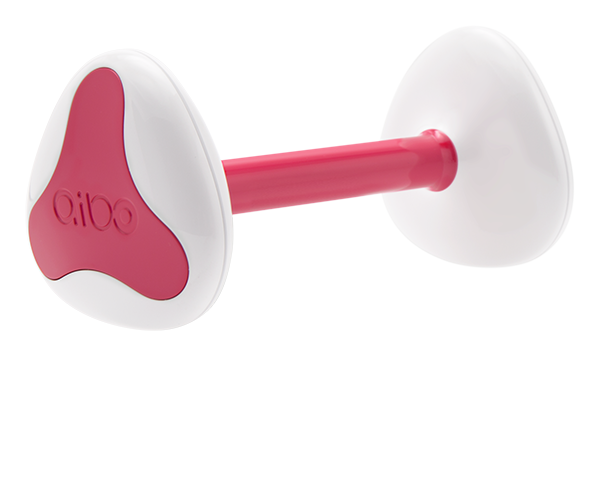 aibone
(sold separately) -
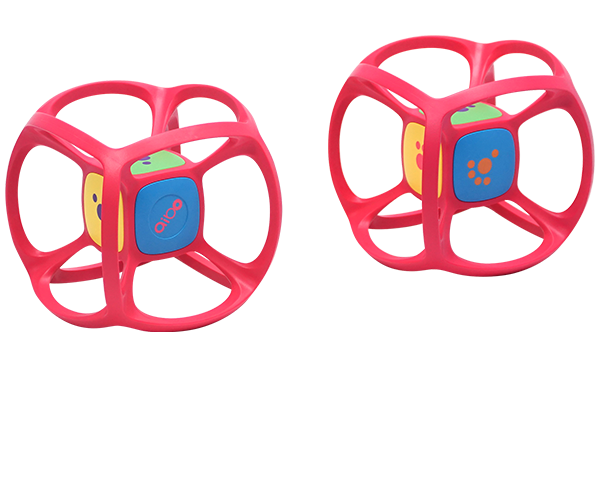 Dice
Dice
(sold separately)
Important notes
- To enjoy this feature, update aibo’s system software to version 8.00 or later.
- Sounds are not added to dances performed after meals or during medley content playback.
- Even if you are not holding a toy, aibo may react with sounds when a toy enters its field of view.
